Google Ads Reporting: How to Track Leads and Bookings
Your Google Ads dashboard shows more leads, but the appointment calendar doesn't look any fuller. The front desk says some callers never booked, some patients rescheduled, and others submitted a form before calling. Meanwhile, the campaign report calls all those actions conversions.
That's where Google Ads reporting needs to move beyond lead counts. For a medical spa selling high-value treatments, the useful question is whether advertising produces consultations patients attend, at a cost the clinic can support. Answering it requires a clear conversion ladder, reliable CRM records, and a reporting routine that separates attribution from patient counts.
Table of Contents
- Core Metrics Every Google Ads Report Needs
- Set a Conversion Ladder From Inquiry to Revenue
- How to Reconcile Ads Against the CRM Each Week
- Why Google Ads and Your CRM Disagree
- Reading Recent Days and Booking Lag
- Move Budget Only After Kept Appointments Confirm It
Core Metrics Every Google Ads Report Needs
Put cost per booked consultation, cost per attended consultation, and booking conversion rate on the first screen. These tell you whether the clinic is acquiring appointments efficiently, whether patients arrive, and whether the landing page and offer turn interest into bookings.
Core metrics for a med spa Google Ads report
| Metric | Where to find it | What it tells a med spa |
|---|---|---|
| Cost per booked consultation | Cost/conv. column, filtered to the booking conversion action | Ad spend per booking, the headline efficiency number |
| Cost per attended consultation | CRM joined to Google Ads through offline uploads | Spend per consultation the clinic actually sees |
| Conversion rate | Conv. rate column, filtered to the booking action | Share of eligible ad interactions that become bookings, helping identify page or offer issues |
| Conversion value per cost | Conversion value columns | Return per dollar, meaningful only with real treatment values |
| Value per conversion | Conversion value columns | Average worth of each counted outcome, which can hide high-value treatments |
| Assisted conversions | Attribution report, conversion paths | Campaigns that helped before the final click, not unique patients |
Once tracking is configured, Google Ads conversion reporting supports conversions, conversion rate, cost per conversion, total conversion value, conversion value per cost, and value per conversion. Choose the columns that answer business questions rather than displaying every available field.
Cost per booked consultation supports acquisition decisions. If it rises, investigate the search terms, offer, landing page, and booking process before assuming bids are the problem.
Cost per attended consultation adds the operational test. An inexpensive booking isn't necessarily an inexpensive patient opportunity if the clinic's calendar contains frequent no-shows.
Separate efficiency from treatment value
Use booking conversion rate to examine the journey after the click. Keep the conversion action consistent, because a rate based on inquiry forms can't tell you how efficiently the page generates confirmed appointments.
Value metrics require more discipline. Don't assign speculative treatment revenue to every inquiry and label conversion value per cost as financial return. Use collected revenue where possible, clearly label deposit values, and segment by treatment so an account-wide average doesn't obscure commercially valuable patients.
Keep assisted conversions in a separate attribution view. They help assess supporting interactions, but adding them to booking totals would misrepresent patient volume.
If you're evaluating an additional attribution tool, TopToolAdvisor lets you compare Wicked Reports with alternatives. Use that comparison to assess reporting fit after defining your conversion events, not as a substitute for doing so.
Practical rule: If a metric can't change a budget, landing page, or booking-process decision this month, move it to the back of the report.
Set a Conversion Ladder From Inquiry to Revenue
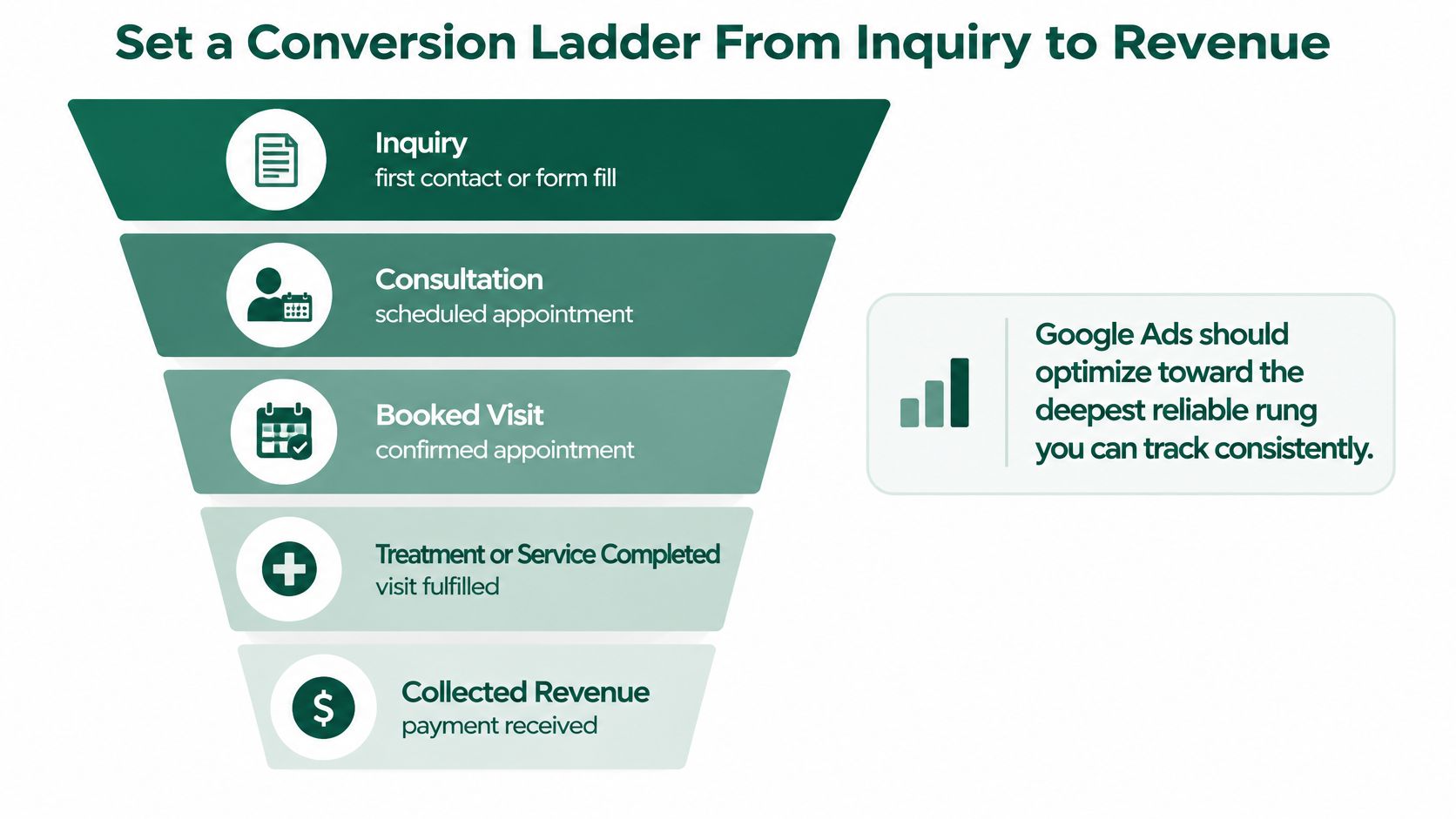
A form submission, an attended consultation, and a paid treatment represent different levels of commercial commitment. Don't make them interchangeable because Google Ads can record each as a conversion.
Build the CRM around explicit stages, with a named person responsible for updating appointment status and payment outcomes.
| Stage | What counts | Role in Google Ads | Report metric |
|---|---|---|---|
| Qualified inquiry | Form or call a staff member confirms as a real prospect | Secondary, for lead quality | Qualified inquiry rate by campaign |
| Booked consultation | Calendar booking or confirmed call | Primary candidate | Cost per booked consultation |
| Attended consultation | Marked as showed in the CRM | Preferred primary for bidding when reliable | Cost per attended consultation |
| Treatment sale | Treatment selected or deposit paid, using a documented rule | Secondary | Sales rate per attended consultation |
| Collected revenue | Invoice paid in full | Secondary | Revenue per dollar of ad spend |
Qualification should reflect a genuine treatment inquiry, not merely a successfully submitted form. Likewise, agreeing to receive a callback isn't a booked consultation unless an appointment has been confirmed.
Use the funnel as a tracking map, while keeping the operational distinction between scheduled, attended, and paid explicit in your CRM.
Choose the deepest reliable bidding event
I would favor attended consultation as the primary bidding action when staff record attendance consistently and uploads arrive reliably. It filters out bookings that never become real consultations.
There's a trade-off: a deeper event gives Google Ads a more meaningful outcome, but it also arrives later and may occur less frequently. If attendance tracking is incomplete, a dependable booked-consultation event is a better starting point than a supposedly superior event with missing records.
Keep the other ladder stages secondary for observation, and inspect campaign conversion goals so bidding doesn't combine raw inquiries with attended appointments. Import milestones using the original Google click identifier and a stable lead ID.
According to Google's data-driven attribution documentation, the model evaluates conversion paths and distributes credit across contributing interactions. That makes attributed results useful for campaign analysis, but a fractional conversion isn't a unique patient.
Keep the commercial chain intact
Our team has tracked 186,400 leads from first inquiry to paid treatment. Following that chain requires operational follow-through, not just a tracking tag; a structured lead follow-up system helps keep appointment outcomes connected to the original inquiry.
Report spend divided by deduplicated bookings, spend divided by attended consultations, and collected treatment revenue divided by spend. Display those CRM outcomes beside attributed conversions rather than replacing either dataset with the other.
How to Reconcile Ads Against the CRM Each Week
Set a recurring reconciliation appointment with the practice manager and paid-media owner. Keep a shared discrepancy log containing the affected campaign, conversion action, date basis, suspected cause, owner, and resolution.
Google's enhanced conversions documentation explains how hashed first-party information and imported offline outcomes can connect leads back to ad interactions. That matching helps attribution, but it doesn't remove the need for clean CRM stages or deduplication.
Work from records, not dashboard screenshots
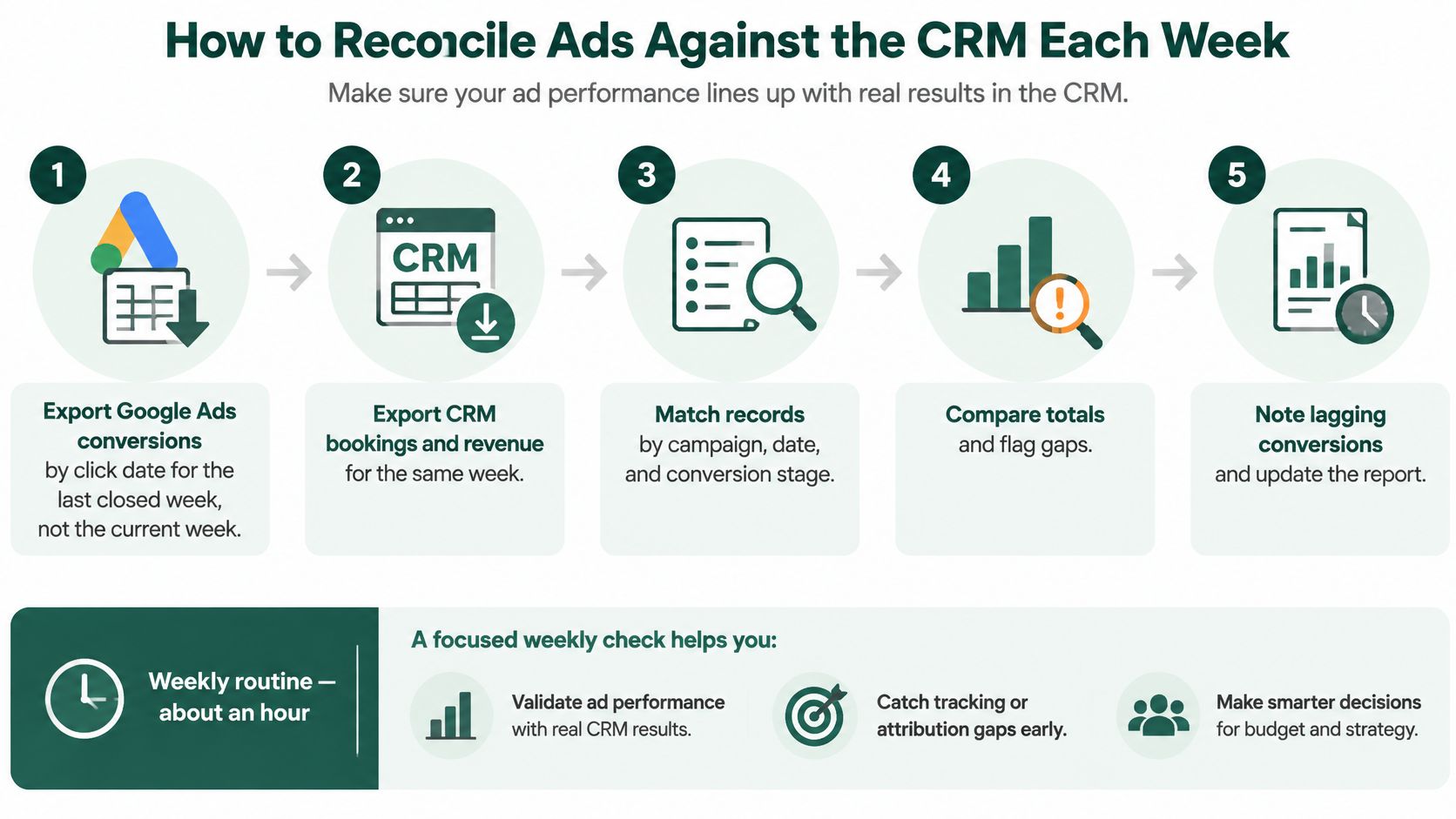
Export the last closed reporting period. Pull Google Ads spend and conversions by interaction date, segmented by campaign and conversion action. Exclude the current partial period from the reconciliation baseline, and label periods that still contain immature outcomes.
Pull the corresponding CRM records. Include lead creation, booking, attendance, sale, and payment timestamps alongside the stable lead ID and Google click identifier. Pull booking-date and attendance-date views for operational checks, then trace those records back to the acquisition cohort before comparing advertising totals.
Deduplicate within each stage. A patient who submits a form and then calls should retain the same lead record where identity can be established. Keep distinct milestones, but don't let browser tracking, call tracking, and an offline upload create duplicate instances of the same booking.
Inspect offline-import health. Check event timestamps, upload timestamps, identifiers, import errors, and rejected records. Don't assume an automated connection succeeded merely because the integration still appears connected.
Calculate stage-level rates. Divide bookings by qualified inquiries, attended consultations by bookings, and treatment sales by attended consultations. Use consistent cohort definitions so later appointments aren't accidentally divided by an unrelated set of recent leads.
Explain the gap. Compare attributed platform outcomes with matched CRM outcomes and record the reason for any difference. Separate expected attribution differences from missing uploads, duplicate events, and incorrectly updated appointment statuses.
Review patient value before cutting campaigns. Look at kept appointments, treatment mix, and collected revenue by campaign. A campaign with fewer inquiries can still deserve budget if those prospects attend and purchase appropriate high-value treatments.
Give unresolved records an owner
A usable med spa CRM needs fields staff can maintain during normal front-desk work. Use explicit statuses such as awaiting response, booking offered, booked, cancelled, no-show, attended, and sold rather than asking staff to explain everything in free-text notes.
Keep unmatched records in an exception queue. Assign someone to resolve missing identifiers, conflicting patient records, or unclear attendance statuses before the next reporting review.
Don't force totals to match by deleting inconvenient records. Explain why they differ and repair the underlying process.
Unbooked inquiries belong in a separate follow-up queue, not automatically in a failed-ad category. Record whether the prospect was unreachable, unsuitable, not ready, or waiting for an appointment option; that distinguishes lost demand from demand the team can still recover.
Why Google Ads and Your CRM Disagree
Google Ads reports more bookings than the CRM, so someone assumes tracking is broken. That conclusion is premature: the systems may be answering different questions, even when both are functioning correctly.
Google's guidance on conversion discrepancies says differences between Google Ads and Google Analytics can reach approximately 20%, partly because attribution models and reporting dates differ. That's a comparison between advertising and analytics systems, not an acceptable-error allowance for your CRM.
| Symptom | Likely cause | Fix |
|---|---|---|
| Ads report more bookings than the CRM | Same patient counted through form, call, and browser events | Deduplicate on lead ID before comparing |
| CRM shows bookings the ads don't credit | Offline upload late or missing the click identifier | Upload promptly with the identifier and check report eligibility |
| Totals differ materially from Google Analytics | Different attribution model and reporting dates | Document the rules and compare on one date basis |
| Lead count rises but patients stay flat | Every form and call counted as a separate person | Count a deduplicated outcome per person at each stage |
| Booking totals shift after a settings change | Counting method changed from once to every | Log the change and rebuild a comparable prior-period view where possible |
Match the question before comparing the answer
Google Ads generally assigns a conversion to the ad interaction that generated it. The CRM usually records the booking when staff or the patient completes it.
Say someone clicks before the reporting period closes and books afterward. The advertising report can credit the earlier period, while the appointment report records the later one. Both entries can be correct.
The counting setting introduces another difference. Once per ad interaction is generally appropriate for lead-generation actions; every conversion suits repeated purchase events when each transaction matters. Neither setting alone guarantees a unique-patient count across separate interactions.
Keep consultation booking, attendance, deposit, and treatment purchase as distinct actions. Otherwise, an apparently strong conversion total may represent several milestones for the same patient.
Distinguish measurement issues from acquisition issues
For a technical review, Trackingplan's conversion data checks for paid media teams provide a useful companion to the CRM reconciliation. Check event firing and conversion settings before concluding that campaign targeting needs rebuilding.
If tracking holds up but kept appointments remain weak, investigate the offer and follow-up process using the same discipline as a Google Ads performance diagnosis. Measurement accuracy and commercial performance are separate problems.
Choose the CRM as the source of truth for deduplicated patient and attendance counts. Display the conversion definition, attribution model, lookback window, timezone, counting method, and date basis on the dashboard, and compare only totals built on compatible rules.
Reading Recent Days and Booking Lag
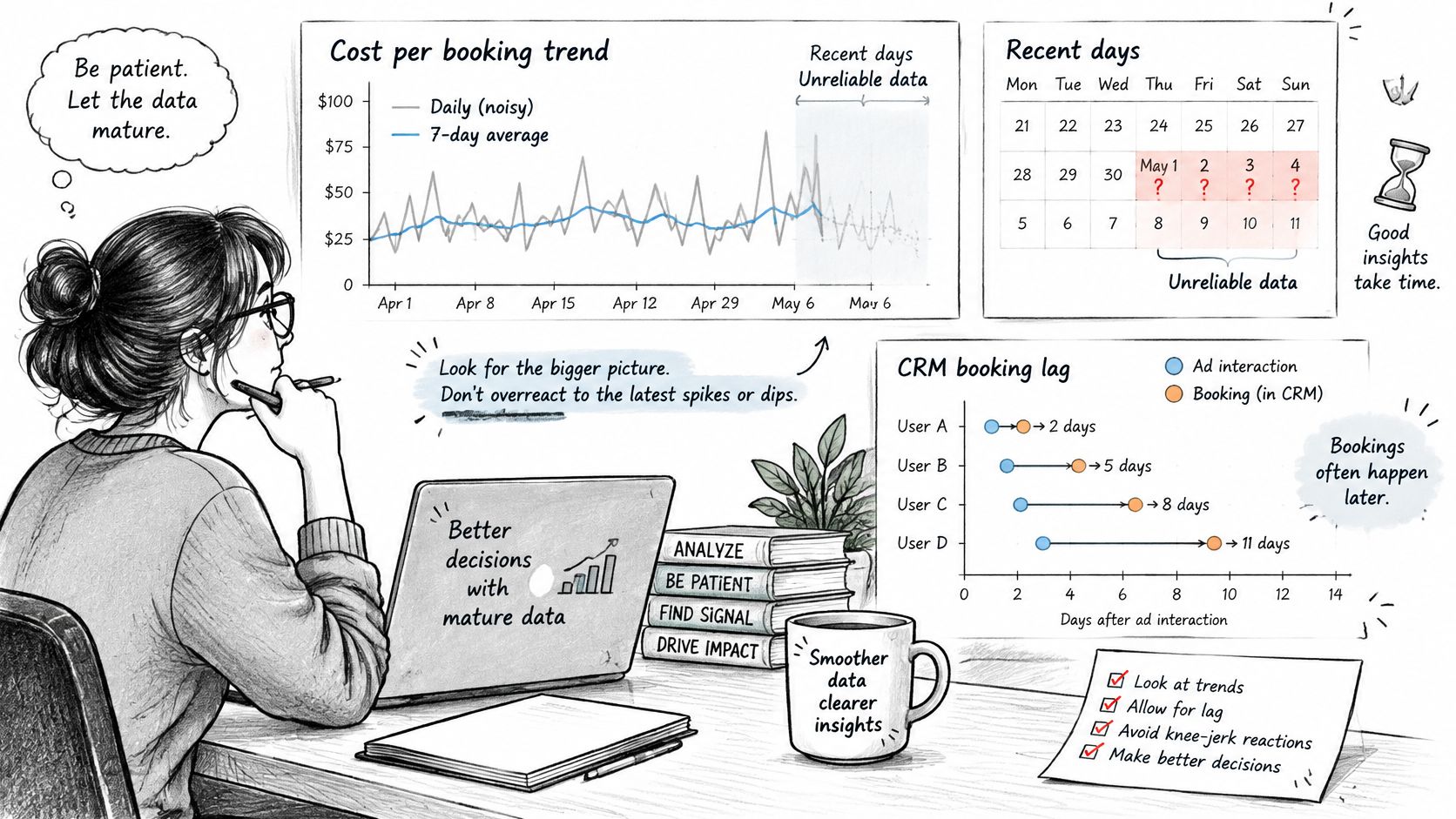
A recent increase in cost per booking makes pausing a campaign tempting. First, establish whether those clicks have had enough time to become appointments.
Google's attribution reporting guidance describes reporting delays of 24–48 hours, potentially longer with non-last-click attribution, and notes that offline conversions uploaded more than seven days after the event can be excluded from certain attribution reports. Reporting freshness and upload eligibility therefore need separate checks.
Compare mature click cohorts
Use the account's observed time to conversion rather than an arbitrary calendar cutoff.
- Measure booking lag. Review how long ad interactions take to produce the chosen conversion, and inspect the distribution rather than relying solely on an average.
- Label incomplete periods. Treat recent results as provisional until the observed average conversion lag has elapsed, while allowing for later revisions from slower journeys.
- Compare like with like. Evaluate click-date cohorts at equivalent maturity instead of comparing a completed month with recent clicks that haven't finished converting.
- Test window settings. Check whether the conversion window includes legitimate later bookings, and distinguish that setting from the lookback used to examine attribution paths.
Don't choose a short window merely because consultations can be booked quickly. A prospect considering a treatment series may need more time than someone responding to an immediate appointment offer.
A recent cost spike is a reason to inspect the report's maturity, not an automatic instruction to reduce spend.
Separate optimization time from reporting delay
Med Spa Scalers reports that ads typically need 60 to 90 days to optimize fully. That operating horizon is different from the delay before an individual booking appears.
In months 4 to 6, with the full system running, the median cost per new patient from ads was $160. This is an example of a mature operating trend, not a Google Ads-only benchmark or a promise for another clinic; results vary by market.
Judge performance after the relevant journey has had time to finish. A short spike in the most recent days rarely justifies a budget change by itself.
Move Budget Only After Kept Appointments Confirm It
Don't increase spend because lead volume looks encouraging. Increase it when mature, reconciled outcomes indicate that the clinic can acquire attended consultations economically and convert them into worthwhile treatment revenue.
Require every condition below before making a performance-led budget move.
- The reporting period is mature. Recent clicks have passed the account's observed average time to conversion, and unresolved late outcomes are clearly labeled.
- Attendance efficiency is sustained. Cost per attended consultation holds across successive monthly reviews rather than appearing favorable during an isolated week.
- The discrepancy log is resolved enough to act. The team can explain material platform-to-CRM differences, including counting settings, attribution choices, and window settings.
- Bidding uses the intended outcome. Attended consultation is the primary conversion, with reliable recording and imports, rather than a raw call or form submission.
Compare campaigns on the same commercial basis
Say a laser campaign generates fewer inquiries than an injectables campaign, but more of those prospects attend. If its cost per attended consultation is lower and treatment economics support the acquisition cost, it may deserve additional budget despite its smaller lead total.
The opposite also applies. Cheap inquiries with frequent no-shows shouldn't receive more money just because the lead conversion rate looks strong.
Check capacity before scaling. A clinic without suitable consultation availability or enough follow-up coverage may struggle to convert additional demand, even when the campaign itself is attracting appropriate prospects.
Make a controlled change
State the share of current spend you'll move, the receiving campaign, and the metric that justifies the decision. Leave unrelated account settings stable so the team can interpret the result.
Schedule the next review after a full conversion lag has elapsed, and reassess the affected click-date cohort. Keep the treatment mix and collected value visible alongside appointment costs, because a cheaper consultation isn't automatically a more profitable acquisition.
The decision record should be short enough for the practice manager to understand: what changed, why it changed, what outcome would support keeping it, and when the team will review it. That turns Google Ads reporting into a budgeting discipline rather than a monthly collection of screenshots.
Med Spa Scalers begins every engagement with a free audit of your ads, follow-up speed, booking flow, and patient list to identify where bookings are slipping through. Visit Med Spa Scalers to request the audit and assess how your reporting connects advertising spend to booked consultations and kept appointments.
See how many patients you're leaving on the table
Get a free marketing audit of your ads, follow-up and booking flow. No pressure, just a clear picture.
Book a free marketing audit